Incident response from Telegram
Telegram is an optional mobile control surface for your hosted mttrly account. Create the account with email first, install the required outbound agent, then connect Telegram for alerts, read-only checks, and human approval of risky actions.
Get the alert, inspect the server, and approve a bounded fix from your phone.
Direct answer
Yes. mttrly lets you respond to Linux server incidents from Telegram without making a phone terminal your normal control path. The agent gathers server status and diagnostics; Telegram shows the result and lets the linked user approve or reject state-changing actions. An mttrly account and installed agent are required for hosted server management.
What Telegram adds to mttrly
Mobile incident alerts
Receive server and service alerts where push notifications are already reliable.
Read before you act
Check health, disk, memory, services, containers, certificates, and scoped logs before requesting a change.
Human approval buttons
Approval-required state changes normally create a pending action with a preview and wait for an explicit approve or reject decision. A separately configured policy is a narrow exception.
One account, several surfaces
Use the same hosted account from the dashboard, Telegram, and MCP-enabled AI IDEs.
Audit trail
Timestamped diagnostics and action activity are recorded for review, with source, decision, outcome, and result context available across action and incident history.
Hosted setup: email first
Create an account with email
Sign up on app.mttrly.com. Email is the primary hosted registration flow.
Add your server
Start the guided onboarding and create a server-specific installation token.
Install the required agent
Run the token-specific command shown in onboarding. The systemd agent connects outbound, so no inbound control port is needed.
Connect Telegram
Link Telegram from your account as the channel for mobile alerts and approvals.
Verify with a read-only check
Open the bot menu or run /healthcheck before requesting any approval-gated action.
The control path
Telegram is the mobile interface in this chain. The agent and policy layer perform the server work; Telegram never becomes a raw inbound shell.
See the full on-call response from your phone or how to rollback a deployment from your phone.
FOUNDER DOGFOOD / CONTROLLED TEST
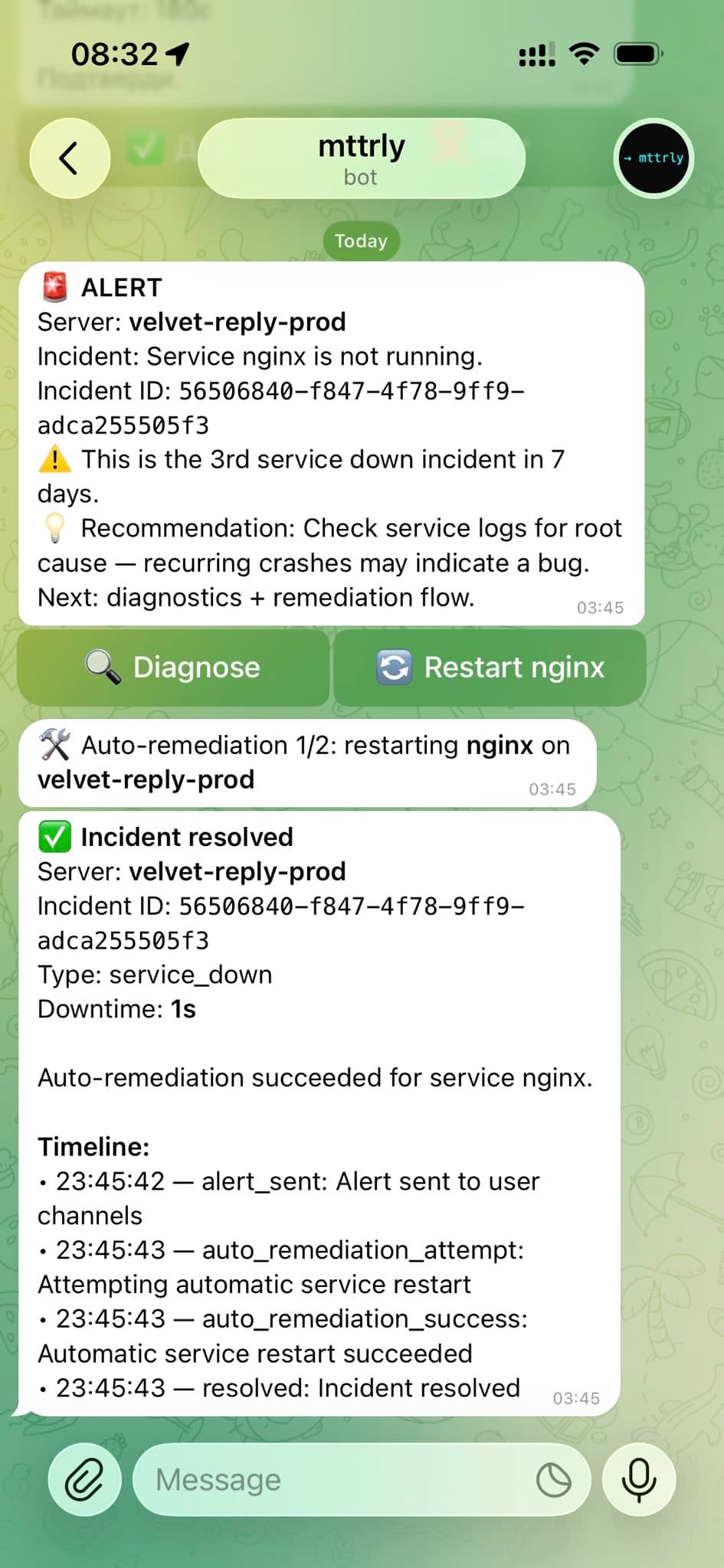
A scheduled nginx failure recovered in the Telegram incident thread
This is a real test on the founder's own production server, not a customer result. Nginx was stopped on purpose, and a narrowly configured restart policy had already been authorized.
- +Telegram received the service-down alert with Diagnose and Restart actions.
- +The mttrly policy layer allowed the configured restart. The outbound agent executed the scoped action, then mttrly checked the service state again.
- +The incident thread reported nginx as recovered with one second of downtime.
- +The timeline shows when the alert fired and follows the remediation through resolution.
What this does not prove
Automatic restart is not the default for state-changing work. In the normal interactive path, an approval-required action becomes pending and waits for Approve or Reject. The recorded exceptions are an applicable preauthorization and a separately approved bounded Investigation, which only covers mttrly_execute_command. A successful generic command also needs a separate check before it can be called service recovery.
Useful incident commands
The bot also provides menus and natural-language workflows. These commands map to scoped server operations; commands marked as changes require approval.
Where the Telegram channel fits
→ Solo developers operating one or several Linux servers away from a laptop
→ Small teams that want a human confirmation step before production changes
→ On-call responders who need first triage and bounded remediation from a phone
→ AI-assisted workflows where Telegram is the mobile approval path and MCP is the IDE path
Telegram bot, autonomous agent, or runbook platform?
The right tool depends on whether you need an open-ended agent, an enterprise automation platform, or a scoped action layer on ordinary Linux servers.
| Option | Best for | Trade-off |
|---|---|---|
| DIY Telegram bot | A narrow command set you fully own | You build authentication, approval policy, auditing, retries, and server compatibility yourself. |
| OpenClaw-style agent | Broad autonomous workflows | A wider action surface needs stronger custom guardrails before it touches production. |
| PagerDuty Runbook Automation | Enterprise runbooks tied to an established incident stack | More platform and process than many single-VPS or indie teams need. |
| mttrly | Scoped Linux diagnostics and approval-gated actions from Telegram or an AI IDE | Requires a hosted account and outbound agent; it is not a replacement for raw SSH in rescue scenarios. |
Use Telegram with the rest of the action layer
Connect the mttrly MCP server for Claude Code, Cursor, or Codex; see how the incident response action layer fits after monitoring; or follow the incident playbooks for concrete Linux failures. For normal operations without a broad terminal surface, read the guide to managing a VPS without raw SSH.
Frequently asked questions
Can I use hosted mttrly with Telegram and no account?
No. Hosted server management requires an mttrly account. Sign up with email first, install the server agent, and then link Telegram as an alert and approval channel.
Does Telegram connect directly to my server?
No. The mttrly agent runs on the Linux server and connects outbound to mttrly. Telegram is a control and notification surface; it does not open a direct inbound shell connection.
Can Telegram restart a service automatically?
Read-only checks can run without changing server state. A restart or another approval-required playbook creates a pending action and waits for explicit human approval unless a separately approved policy applies.
Does Telegram replace SSH completely?
No. It handles routine checks and prepared incident actions. Initial installation, an offline agent, boot problems, firewall lockout, deep forensics, and provider rescue work can still require SSH or a provider console.
Can Claude Code and Telegram use the same server?
Yes. Claude Code, Cursor, or Codex can connect through mttrly MCP, while Telegram remains available for mobile alerts and approval decisions on the same hosted account.
Put the approval path on your phone
Create the account with email, connect the server agent, then add Telegram for mobile alerts and approvals.