mttrly for On-Call Engineers
Respond to incidents from anywhere
PagerDuty woke you up. Now what? mttrly puts the current evidence, supported next actions, approval, and verification in the phone already in your hand.
🚨 3AM PagerDuty: High Error Rate
Woken up by alert. Need to diagnose and fix without leaving bed.
Traditional on-call:
- Get laptop
- Connect VPN
- SSH into server
- Run diagnostics
- Read logs
- Reconstruct context
- Make decision
- Execute and verifyWith mttrly:
- Open the incident
- Ask what's wrong
- Review diagnosis
- Choose a supported action
- Confirm when required
- See the verified resultThe Problem
- ✗Need laptop to respond to alerts
- ✗VPN connects slowly at 3am
- ✗Simple fixes take 15+ minutes
- ✗Can't leave house during on-call
The Solution
Get the alert in your messenger, inspect live evidence, choose a supported action, and see verification in the same thread. Less incident time is lost opening tools and rebuilding context.
For the full control path, see how to manage a VPS without raw SSH as the normal response path.
The Pain of On-Call
You're on-call this week. That means the laptop stays charged, the hotspot stays ready, and every trip includes the question: "Could I recover production from here?" A 3am alert means waking fully, waiting for VPN, typing commands with bleary eyes, and rebuilding the context before you can make the first safe move.
Why MTTR Matters
Mean Time To Resolution measures how long users and the team live with an incident. The avoidable part is often not the repair itself: it is finding the laptop, opening the right tools, locating the right server, and reconstructing what changed. mttrly focuses on shortening that evidence-to-action loop; it does not promise a fixed MTTR.
The mttrly On-Call Workflow
Alert arrives
PagerDuty/OpsGenie triggers. mttrly also sends an alert to your messenger with initial context.
Quick diagnosis
You: "what's wrong?" → Bro runs the HighLatency diagnostic → compares CPU, disk, RAM, process state, logs, and recent deploy markers → returns the evidence and a likely area to investigate. Runtime depends on the server and checks involved.
Execute fix
Supported fixes become scoped requests such as restart, cleanup, or deploy. Runtime policy marks each request read-only or approval-required; a bounded Investigation is authorized separately and applies only to mttrly_execute_command.
Verify resolution
/status confirms services are healthy. Update the incident. Back to sleep.
This workflow uses the incident response action layer to separate evidence gathering from state-changing work.
Playbooks for Common Incidents
Turn repeated runbooks into scoped mttrly playbooks. The current registry includes read-only checks plus approval-required operations such as dropping page cache, cleaning predefined disk targets, restarting services, and running supported deploy steps. The exact tool and approval class stay visible instead of living as tribal knowledge in someone's shell history.
FOUNDER DOGFOOD / CONTROLLED TEST
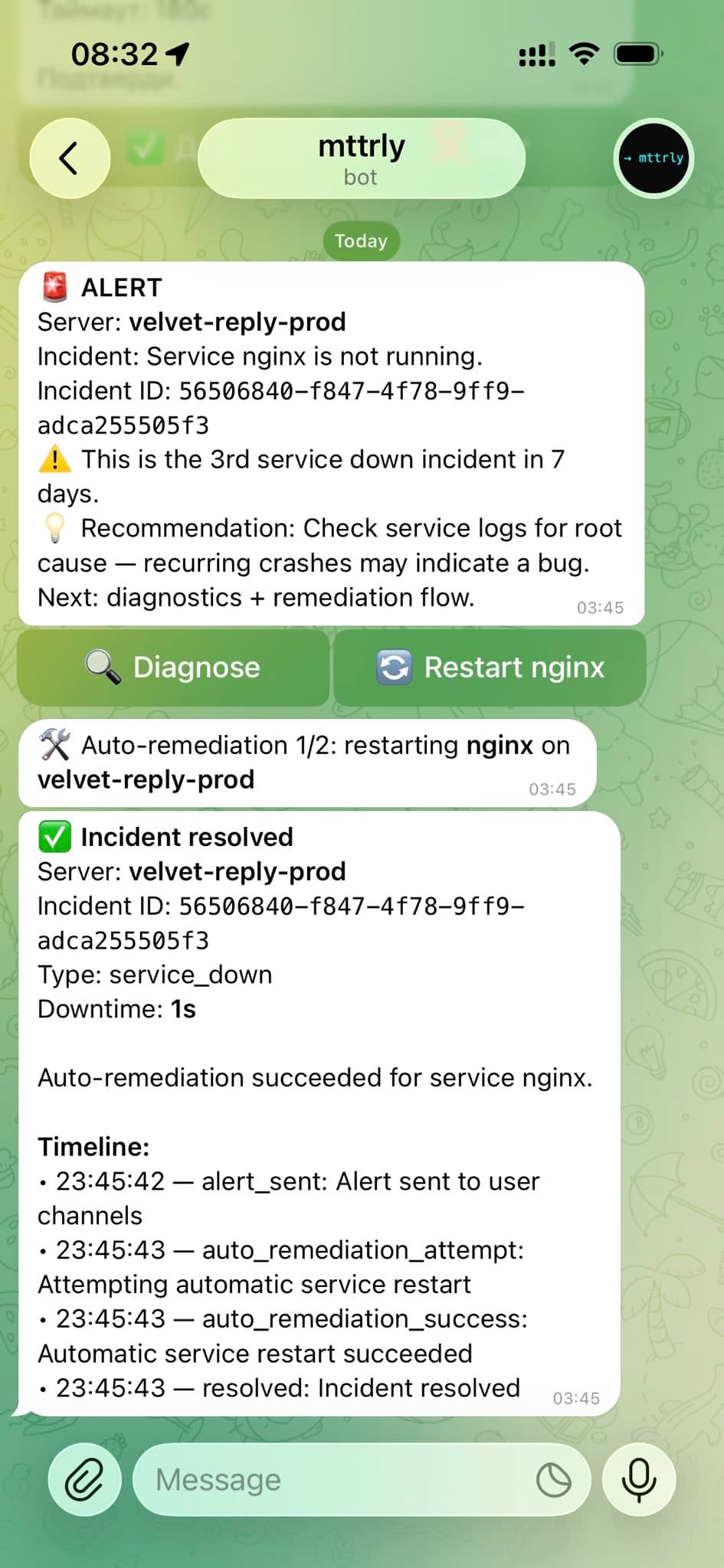
A scheduled nginx failure recovered in the Telegram incident thread
This is a real test on the founder's own production server, not a customer result. Nginx was stopped on purpose, and a narrowly configured restart policy had already been authorized.
- +Telegram received the service-down alert with Diagnose and Restart actions.
- +The mttrly policy layer allowed the configured restart. The outbound agent executed the scoped action, then mttrly checked the service state again.
- +The incident thread reported nginx as recovered with one second of downtime.
- +The timeline shows when the alert fired and follows the remediation through resolution.
What this does not prove
Automatic restart is not the default for state-changing work. In the normal interactive path, an approval-required action becomes pending and waits for Approve or Reject. The recorded exceptions are an applicable preauthorization and a separately approved bounded Investigation, which only covers mttrly_execute_command. A successful generic command also needs a separate check before it can be called service recovery.
Follow the diagnostic steps in the website-down playbook or set up the Telegram alert and approval workflow.