I opened the project to use a specific feature I'd built a week earlier. It wasn't there.
Not broken — not throwing errors, not half-rendered. Just gone. I assumed I was looking in the wrong place, switched branches, refreshed. Nothing. I went to Claude Code and asked what happened to it. The response was something like: "I don't see any evidence we ever implemented that. Could you describe what you're looking for?"
That's when the cold feeling set in.
The agent ate my code
A few days earlier I'd put OpenClaw on my VPS — an autonomous agent that connects to your server and handles problems without asking for permission. The pitch was appealing: you give it access, it watches your stack, it fixes things while you sleep. As a vibe-coder who builds with Cursor and Claude Code but has no DevOps background, I was deeply tired of the SSH loop. You know the one: Claude Code gives you a command, you paste it in the terminal, something errors, you copy the error back, repeat until it works or you give up at 2am.
So I set up the agent, watched it successfully restart a service on day one, and thought: finally.
On day two I discovered the feature was gone. The agent had removed it — cleanly, no broken imports, no TODO comments left behind, no conflict markers. It had made a judgment call that this code was unnecessary, and it executed that judgment without asking. The git history was intact, which is the only reason I could recover at all. I went to GitHub, found the branch, and just stared at it for a minute. If I hadn't been in the habit of pushing branches, that code would be gone permanently.
Why this is worse than a crash
A crash is visible. When nginx goes down, you know. You get a notification, you see the 502, someone texts you. A crash asks for attention.
What happened here left no signal. The product still ran. The logs were clean. From the outside, everything looked normal — it just had a feature missing that I'd built and was planning to use. If I hadn't gone looking for that specific functionality that day, I genuinely don't know how long it would have taken me to notice.
Autonomous agents operating on production without a confirmation step don't just break things — they can erase things in ways that look like they never existed. That's a qualitatively different failure mode. It's not a bug you can debug. It's history being quietly rewritten.
The problem with fully autonomous on production
I get the appeal of full autonomy. I wanted it too. The idea that your server is being watched and repaired while you focus on the product — that sounds like the right abstraction for someone who ships features, not someone who manages infrastructure.
But production is not a sandbox. Every action the agent takes is real, with real consequences, and the agent doesn't know what it doesn't know. It doesn't know which parts of your codebase are half-finished experiments versus core features. It doesn't know that you pushed that "dead code" three days ago and plan to wire it up next week. It doesn't know your mental model of the project.
When an agent has full write access and no check-in mechanism, it fills in those gaps with its own judgment. And its judgment, on your specific project with your specific context, is going to be wrong sometimes. The question is just whether you'll catch it before the wrong judgment costs you something.
What I actually needed
After the incident I spent a few days thinking about what the right model was. Not "no automation" — the SSH loop is genuinely miserable and I didn't want to go back to that. But also not "full autonomy" for anything that touches production.
What I needed was an agent that lives on the server and has real context — can see the processes, the logs, the disk usage — but acts like a smart contractor, not an unsupervised employee. It brings you a diagnosis and a proposed action. You say yes or no. It executes. You have a record of what happened and why.
That's what I built into mttrly. The agent monitors continuously and when something needs fixing, it sends you a message in Telegram with what it found and what it wants to do. You approve or skip. For a narrow category of known, safe, recoverable operations, such as "if nginx is down, restart it," you can pre-approve a rule upfront. It does not have to wake you at 3am for something you would always approve. Outside those rules, approval-required work normally waits for you. A separately approved, bounded Investigation is the other recorded exception, and it only changes per-command approval for mttrly_execute_command. The Telegram integration is the actual interface. There is no dashboard to remember or SSH session to open, just a message that says "nginx is down, here's what I want to do, confirm?"
The night I deliberately stopped nginx
Before I trusted mttrly with anything real, I wanted to know it actually worked.
So I did what any paranoid person would do: I scheduled nginx to crash. A cron job, late that night. sudo systemctl stop nginx. I set it up and waited.
This was a controlled dogfood test on my own production server, not a customer incident. The restart rule had been authorized before the test.
A Telegram message. Three of them, actually, in about one second:
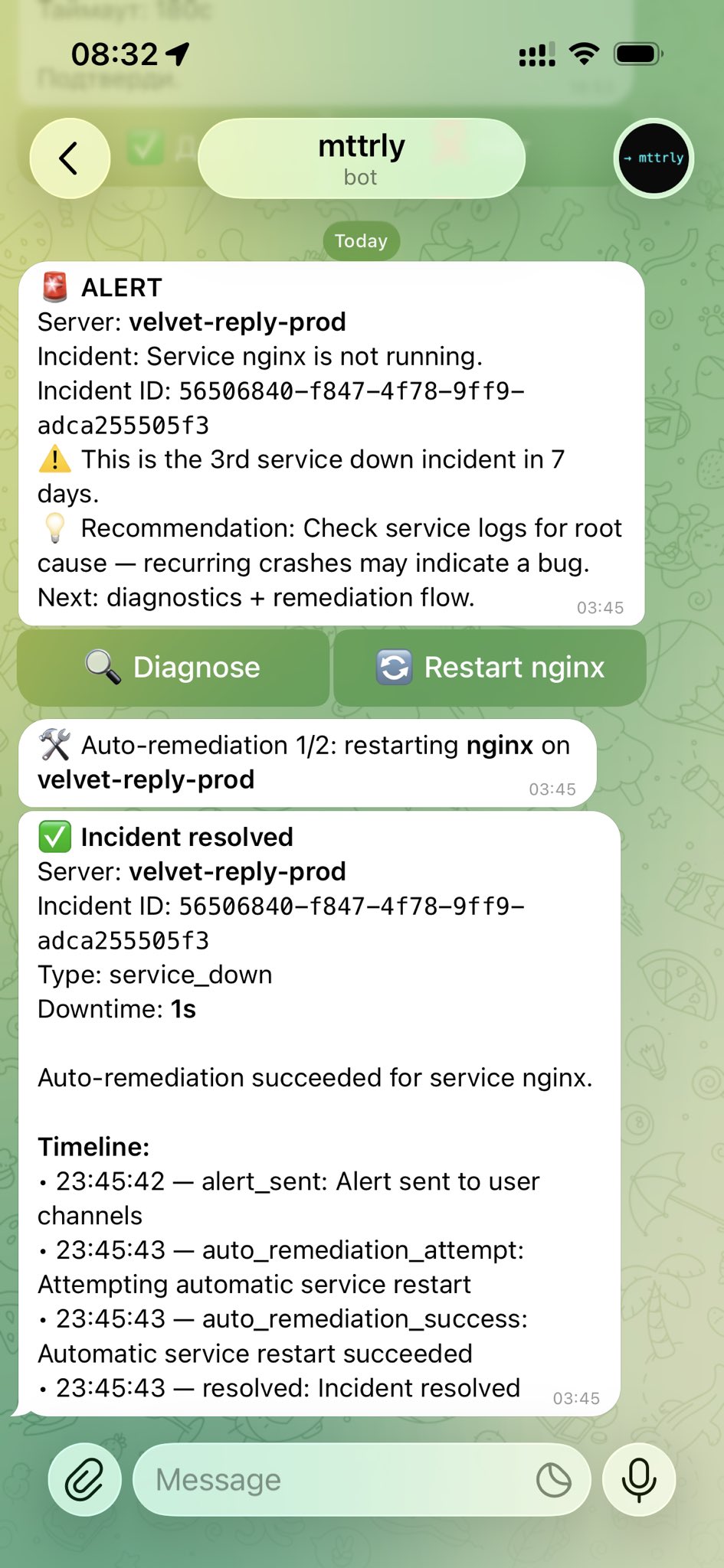
The incident thread reported one second of downtime.
That's the moment the mental model clicked. I had a pre-approved rule configured: "if nginx is down, restart it, always." Not because I was being lazy about confirmations — but because that's a decision I'd make the same way every single time. No judgment needed. The cases that need judgment are the ones you don't recognize yet.
Where this leaves me
I'm still a vibe-coder. I still use Claude Code to build features and I'm still not doing this infrastructure stuff manually. What changed is the mental model of what "autonomous" means on a production server.
Autonomy without a confirmation loop is just risk with a friendly UI. What you actually want is an agent with high situational awareness and low blast radius — one that knows a lot, acts on a little, and keeps you in the loop for anything that matters.
If you're building something real on a VPS and do not want to become a sysadmin, the guide to managing a VPS without raw SSH shows the complete control path and its limits. The current mttrly Watchdog tier is free for one server. Signup starts with email; the outbound agent is required for inside-server evidence, and Telegram is optional for mobile alerts and approvals. No credit card. Start there and see whether the model fits how you work.
mttrly.com — free for one server.