Manage your VPS from Claude Code, Cursor, or Codex without raw SSH
Use mttrly as the incident response action layer between AI IDEs and your Linux servers.
Direct answer
Yes. mttrly lets Claude Code, Cursor, and Codex manage a VPS without opening raw SSH as the normal control path. An outbound agent runs on your Linux server, exposes scoped MCP tools, and returns status, logs, diagnostics, playbooks, pending approvals, and audit history. Read-only checks can run directly; approval-required remediation normally creates a pending action for human review. A user-authorized, bounded mttrly_execute_command Investigation or narrowly configured preauthorization are explicit exceptions, and both remain audited.
The normal control path
SSH remains the bootstrap and break-glass path. It is not the interface exposed to the AI assistant during normal incident response.
The problem with raw SSH for AI assistants
SSH is still the right emergency tool for operators, but it is a poor default interface for an AI assistant. The assistant receives a terminal-shaped surface, the operator must add safety policy around it, and routine incident work becomes harder to audit as a workflow.
- -An SSH MCP server gives an AI assistant a broad terminal-shaped interface unless you add your own guardrails.
- -A raw session makes it harder to separate read-only inspection from risky state changes.
- -Audit trails often depend on shell history, bastion logs, or cloud-specific tooling instead of the incident workflow itself.
- -Mobile remediation is awkward when the fallback is a terminal session from a phone.
See the founder dogfood incident where raw SSH found the cause, but the bot exposed the incident history.
How mttrly works instead
Outbound agent on the server
The mttrly agent runs on your Linux server and connects outbound, so the normal path does not require exposing an inbound SSH control surface to the AI client.
MCP endpoint for AI IDEs
Claude Code, Cursor, and Codex connect to mttrly through an MCP endpoint, then discover available servers, tools, limits, and approval requirements.
Scoped tools before shell access
The assistant uses scoped tools for status, alerts, diagnostics, playbooks, pending approvals, and audit history. One-off command execution, when enabled, normally follows the approval path; a user-authorized, bounded mttrly_execute_command Investigation is the explicit command exception, and it remains audited.
Approval gates and audit log
Approval-required remediation normally creates a pending action for human review. A bounded mttrly_execute_command Investigation or narrowly configured preauthorization must be authorized separately, and both remain audited.
Telegram and mobile control path
The same action layer can be controlled from Telegram, so you can respond from a phone when an alert fires away from your laptop.
Start with the mttrly MCP server, then check the MCP setup docs for client configuration and approval behavior. For mobile approval, connect the Telegram integration.
Raw SSH vs cloud command runners vs mttrly
| Capability | Raw SSH | AWS SSM / cloud run command | GitHub Actions | mttrly |
|---|---|---|---|---|
| Requires cloud control plane | No | Yes | Requires GitHub CI runner path | No; uses outbound agent |
| Works on bare VPS / Hetzner / DigitalOcean / Linode | Yes | Only if enrolled in a supported cloud path | Indirectly, if workflows can reach the host | Yes |
| Normal control path avoids raw SSH | No | Yes, but still command-centric | Yes, through workflows | Yes, through scoped MCP tools |
| Human approval before risky action | Manual discipline | Possible with cloud controls | Possible with environments | Runtime policy with approval gates |
| Audit trail | Depends on host and bastion setup | Cloud audit logs | Workflow logs | Approval and action audit log |
| Can diagnose logs/status | Yes, manually | Yes, command-based | Limited to scripted checks | Yes, with diagnostics and server tools |
| Can remediate from phone/AI IDE | Possible, but terminal-heavy | Cloud console or CLI | Workflow dispatch if prepared | Telegram or Claude Code / Cursor / Codex |
Restart nginx from Claude Code without SSH
A realistic flow starts with discovery, reads before writes, prefers a playbook, and only executes after explicit confirmation.
mttrly_get_capabilitiesCheck what the current plan and session can do
The assistant starts by reading available tools, restricted tools, and plan limits before attempting any action.
mttrly_list_serversFind the target server
It lists connected servers and selects the VPS you named, such as prod-web-01.
mttrly_get_server_statusRead current health
It checks CPU, RAM, disk, active alerts, and basic service reality before assuming nginx is the only issue.
mttrly_run_diagnosticRun a targeted diagnostic
For "nginx is down", the diagnostic can inspect status, logs, ports, and likely failure points through mttrly tools.
mttrly_list_playbooksLook for a bounded remediation
The assistant prefers a restart-nginx or nginx-reload playbook over a free-form command when one is available.
mttrly_run_playbookCreate the pending action
If the playbook changes server state, mttrly returns a pending action with details instead of silently restarting the service.
mttrly_approve_actionExecute only after explicit human confirmation
The assistant may call this tool only after you review the pending action and explicitly approve or reject it.
mttrly_get_audit_logReview the result and audit context
The audit tool returns timestamped server activity and identifies its source and outcome, with output context when available. The separate action result shows whether execution completed and how long it took. It also includes the output.
If a 502 response is the starting symptom, follow the nginx 502 diagnosis path.
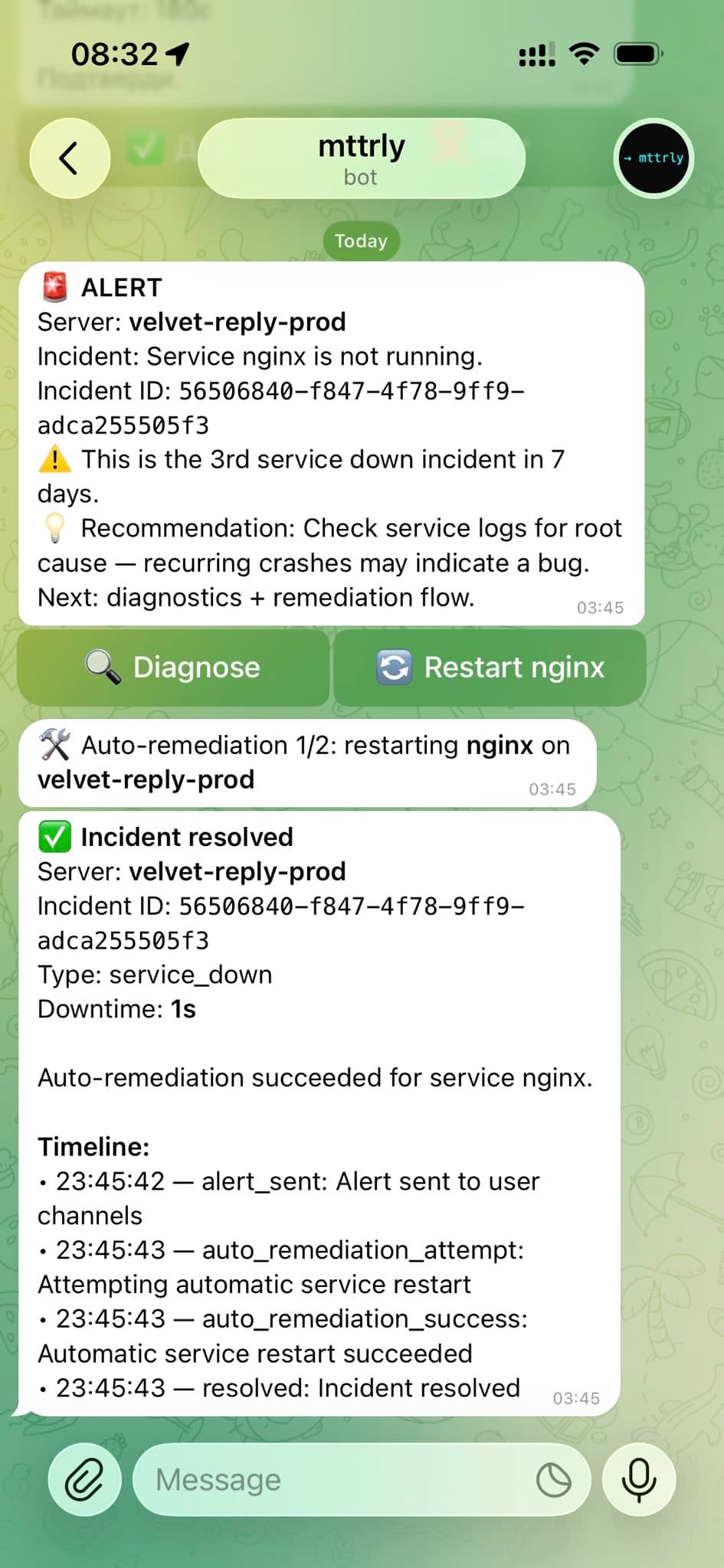
FOUNDER DOGFOOD / CONTROLLED TEST
A scheduled nginx failure recovered in the Telegram incident thread
This is a real test on the founder's own production server, not a customer result. Nginx was stopped on purpose, and a narrowly configured restart policy had already been authorized.
- +Telegram received the service-down alert with Diagnose and Restart actions.
- +The mttrly policy layer allowed the configured restart. The outbound agent executed the scoped action, then mttrly checked the service state again.
- +The incident thread reported nginx as recovered with one second of downtime.
- +The timeline shows when the alert fired and follows the remediation through resolution.
What this does not prove
Automatic restart is not the default for state-changing work. In the normal interactive path, an approval-required action becomes pending and waits for Approve or Reject. The recorded exceptions are an applicable preauthorization and a separately approved bounded Investigation, which only covers mttrly_execute_command. A successful generic command also needs a separate check before it can be called service recovery.
When mttrly does not replace SSH
mttrly is the normal incident response action layer, not a promise that SSH disappears from infrastructure forever.
- -Initial agent installation may require SSH or another bootstrap path.
- -If the agent is offline or outbound connectivity is blocked, mttrly cannot reach the server until connectivity is restored.
- -Kernel, bootloader, firewall lockout, and rescue-mode emergencies may still require provider console or SSH-level access.
- -Deep forensics and arbitrary interactive shell work remain better suited to a controlled SSH session.
- -First-time infrastructure provisioning may still happen through Terraform, cloud consoles, SSH, or provider-specific tools.
Where monitoring fits
Grafana, Datadog, Sentry, PagerDuty, and similar systems detect symptoms, visualize telemetry, or wake someone up. mttrly acts after the alert: it helps the operator diagnose the server, choose a scoped remediation, approve risky steps, and leave an audit trail.
mttrly is not an observability replacement. It is closer to an incident response action layer that pairs well with an existing monitoring stack and with on-call response workflows.
For a concrete failure path, see the website-down incident playbook or browse all Linux incident guides.
FAQ
Can Claude Code manage my VPS without SSH?
Yes. Claude Code can use mttrly through MCP to inspect server status, run diagnostics, list playbooks, request remediation, and review audit logs without opening a raw SSH session as the normal control path. Approval-required work normally creates a pending action; a separately authorized, bounded mttrly_execute_command Investigation and narrowly configured preauthorization are audited exceptions.
Does mttrly replace SSH completely?
No. mttrly reduces the need to use SSH for routine incident response, diagnostics, and prepared remediation. SSH may still be needed for initial installation, offline agent recovery, deep forensics, provider rescue mode, and first-time infrastructure provisioning.
Is this safer than an SSH MCP server?
It is safer for common production operations when you want an AI assistant to work through scoped tools instead of a broad terminal interface. mttrly separates read-only diagnostics from approval-gated actions and records activity in an audit log. It does not remove the need for careful access control.
Does it work on Hetzner/DigitalOcean/Linode?
Yes, mttrly is designed for ordinary Linux servers and VPS hosts, including bare VPS environments such as Hetzner, DigitalOcean, and Linode. The server needs the mttrly agent installed and outbound connectivity to the mttrly service.
What happens if the mttrly agent is offline?
If the agent is offline, mttrly cannot run live diagnostics or remediation on that server. You can still see cached or previously recorded data where available, but restoring the agent or server connectivity may require SSH, a provider console, or a bootstrap recovery path.
Can I approve fixes from Telegram?
Yes. Telegram is a supported control path for mttrly. Risky actions can be routed through human approval so you can review and approve or reject a fix from your phone instead of opening an SSH client.
Can I disable command execution and use only playbooks?
Yes, where your plan, MCP client, or workspace policy restricts the tools exposed to the assistant. mttrly can operate through read-only diagnostics and prepared playbooks, with playbooks still approval-gated when they change server state. If mttrly_execute_command is enabled, treat it as a restricted, audited fallback rather than the default path.
Put an action layer behind your AI IDE
Start with read-only MCP tools, then add approval-gated playbooks when you want mttrly to help remediate production incidents.